E-Challan Check Lahore – Verify Punjab Police Traffic Fines Online with Accuracy & Ease (2025)
Many Lahore drivers only discover pending traffic challans during vehicle renewals or routine traffic inspections. Fortunately, Pakistan’s traffic enforcement has gone fully digital — allowing motorists to check Punjab Police E-Challans online instantly using either their vehicle registration number or CNIC.
This complete guide explains how to verify your Lahore e-challan, how PSCA’s digital enforcement system works, and how to download official challan slips for payment or record-keeping.
How to Check Your E-Challan Online in Lahore (Step-by-Step)
Lahore’s digital challan system is operated by the Punjab Safe Cities Authority (PSCA), which manages automated camera-based traffic enforcement.
Follow these steps to check your challan accurately:
Step 1 – Visit the Official PSCA Portal
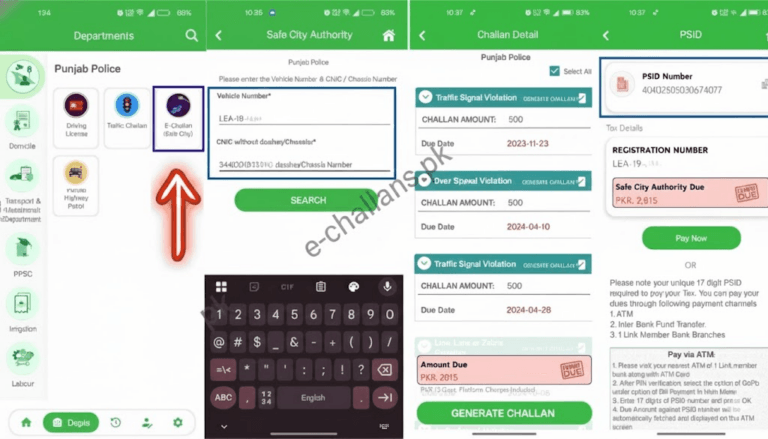
Step 2 – Enter Your Search Details
You can verify your challan using:
- Vehicle registration number, or
- CNIC (without dashes or spaces)
Step 3 – Click “Check Challan”
Within seconds, the system displays complete challan details:
- Challan number
- Vehicle information
- Violation type
- Fine amount
- Date and time of offense
- Violation location (where applicable)
- Payment status (paid or pending)
Tip: Always enter the vehicle number exactly as recorded by the Excise Department (e.g., LEB1234 without spaces or dashes).
About the Punjab Safe Cities Authority (PSCA)
The PSCA operates Lahore’s Smart Traffic Enforcement Network, using a citywide grid of HD surveillance, AI monitoring, and Automatic Number Plate Recognition (ANPR) systems.
These systems monitor:
- Red-light violations
- Helmet non-compliance
- Illegal U-turns and wrong-lane driving
- Over-speeding
- Mobile phone usage while driving
All violations are:
- Automatically recorded by cameras
- Linked to the registered vehicle owner
- Uploaded to Punjab Police traffic records
- Available online 24 hours a day
Since implementation, PSCA has issued over one million automated e-challans, dramatically reducing manual ticketing and ensuring transparent enforcement across Lahore.
Common Traffic Violations & Updated Fine Comparison (2025)
| Violation Type | Motorcycle Fine (Rs.) | Car Fine (Rs.) |
|---|---|---|
| Driving without license | 200 | 500 |
| Riding without helmet | 2,000 | — |
| Red-signal violation | 300 | 500 |
| More than two riders on bike | 300 | — |
| Wrong parking / obstruction | 2,000 | 2,000 |
| Mobile phone usage while driving | 200 | 500 |
| No fitness certificate | 200 | 500 |
| Wrong-way or one-way violation | 200 | 2,000 |
All violations remain digitally attached to your vehicle record until the fine is cleared.
How to Download a Duplicate E-Challan Slip in Lahore
Lost your challan slip or did not receive one? Downloading a verified duplicate slip online takes less than one minute.
Download Procedure
- Visit https://echallan.psca.gop.pk
- Search using your vehicle number or CNIC
- Click Check Challan
- Select Download / Print Challan Slip
The duplicate slip is accepted for payment at:
- Bank of Punjab (BOP) branches
- Punjab Police Traffic Facilitation Centers
- All approved online payment channels
Tip: Keep a digital copy saved on your mobile phone for proof during traffic checks.
Check E-Challan by Vehicle Number or CNIC
Vehicle Number Search
- Enter your license plate number
- View all challans linked to that vehicle
- Track payment history and pending fines
Ideal for:
- Private vehicle owners
- Motorcyclists
CNIC Search
- Enter your CNIC number
- View all vehicles registered in your name
- Display challans across every linked vehicle
Recommended for:
- Families with multiple cars
- Business owners with registered fleets
- Vehicle dealers
Always rely only on the official PSCA portal for verified challan results.
Common Issues During E-Challan Checks – Solutions
| Issue | Cause | Solution |
|---|---|---|
| No challan appearing | System sync delay | Recheck after 24–48 hours |
| Incorrect vehicle details | Records not updated | Update registration at Excise Office |
| Duplicate challan showing | Camera overlap | Save proof and contact PSCA |
| No challan found | No active fines | Continue safe driving |
For corrections or disputes, contact:
- Nearest Traffic Police Service Center
- PSCA help desk
Bring:
- CNIC
- Vehicle registration papers
- Digital or printed challan copy
Road Safety Benefits of the E-Challan System
Lahore’s digital traffic monitoring has improved safety across major intersections and highways:
- 40% reduction in red-signal violations
- 30% increase in helmet compliance
- Higher lane discipline
- Improved registration and documentation enforcement
- Significant decline in intersection accidents
Regular challan checks help motorists maintain clean records and support citywide safety improvements.
Frequently Asked Questions – E-Challan Check Lahore
Q1: How do I check my e-challan in Lahore?
Visit echallan.psca.gop.pk and search using your vehicle number or CNIC.
Q2: Can I download a challan slip online?
Yes. Search your challan and click Download / Print from the PSCA portal.
Q3: Can I check challans using CNIC only?
Yes. CNIC search shows all vehicles registered under your name.
Q4: When does a newly issued challan appear online?
Usually within 24 hours of the violation being recorded.
Q5: What if I receive a wrong challan?
Visit the nearest Traffic Police office or PSCA support desk with your documents for immediate review.
Conclusion
Checking your E-Challan in Lahore is now fast, accurate, and fully digital. By using the official PSCA Portal, drivers can verify fines instantly, download challan slips, and avoid unnecessary penalties.
Regular challan monitoring combined with good driving habits not only keeps your vehicle record clean—it also supports safer roads throughout Lahore and Punjab.